See ChamberedIn in 45 Seconds
A quick look at how ChamberedIn brings members, dues, events, and communications into one place for the people who run the organization.
Your Organization Runs on Too Many Tools
 ChamberedIn
Most membership organizations keep the member list in one place, take dues in another, run events in a third, and email everyone from a fourth. The member who joined last week is typed into three systems, and the renewal that lapsed is a note someone meant to follow up on. A legacy AMS was supposed to fix this, and instead it added logins, fees, and a screen no one likes opening.
When members, dues, events, and communications do not talk to each other, the work falls on you to keep them in sync. That is the time your week disappears into.
Everything Your Organization Runs, in One Platform
Collect Dues Automatically, and Get Paid to Your Own Bank
Set up recurring or one-time dues and let members pay online. Payouts go straight to your organization's bank through Stripe, so the money lands where it belongs without a manual transfer. When a payment fails, the account is handled for you and the member gets a pay-now link.
- Charge recurring or one-time dues, and members pay by card online.
- Stripe Connect sends payouts directly to your organization's bank account.
- A failed payment suspends access automatically and sends the member a pay-now link to fix it.
Fill Events Without the Busywork
Set up a free or paid event, take RSVPs, and let the reminders go out for you by email, text, and voice. Recurring events and calendar sync are built in, so a monthly mixer is set up once. You watch the RSVPs come in instead of chasing them.
- Create free or paid events with ticketing, RSVPs, and refund policies.
- Send reminders automatically by email, text, and voice so fewer seats sit empty.
- Set events to recur and sync to Google and Microsoft calendars.
Reach Every Member From One Place
Post to channels, send email and text, and keep the member feed active without switching tools. The Communications Center gives you reusable templates and automations, so the welcome note and the renewal reminder send themselves. Write the message once and let it reach the right members.
- Send by channel, member feed, email, or text from one place.
- Save reusable templates for the messages you send every month.
- Set automations so routine messages, like a welcome or a renewal reminder, send on their own.
Walk Into the Board Meeting With the Numbers
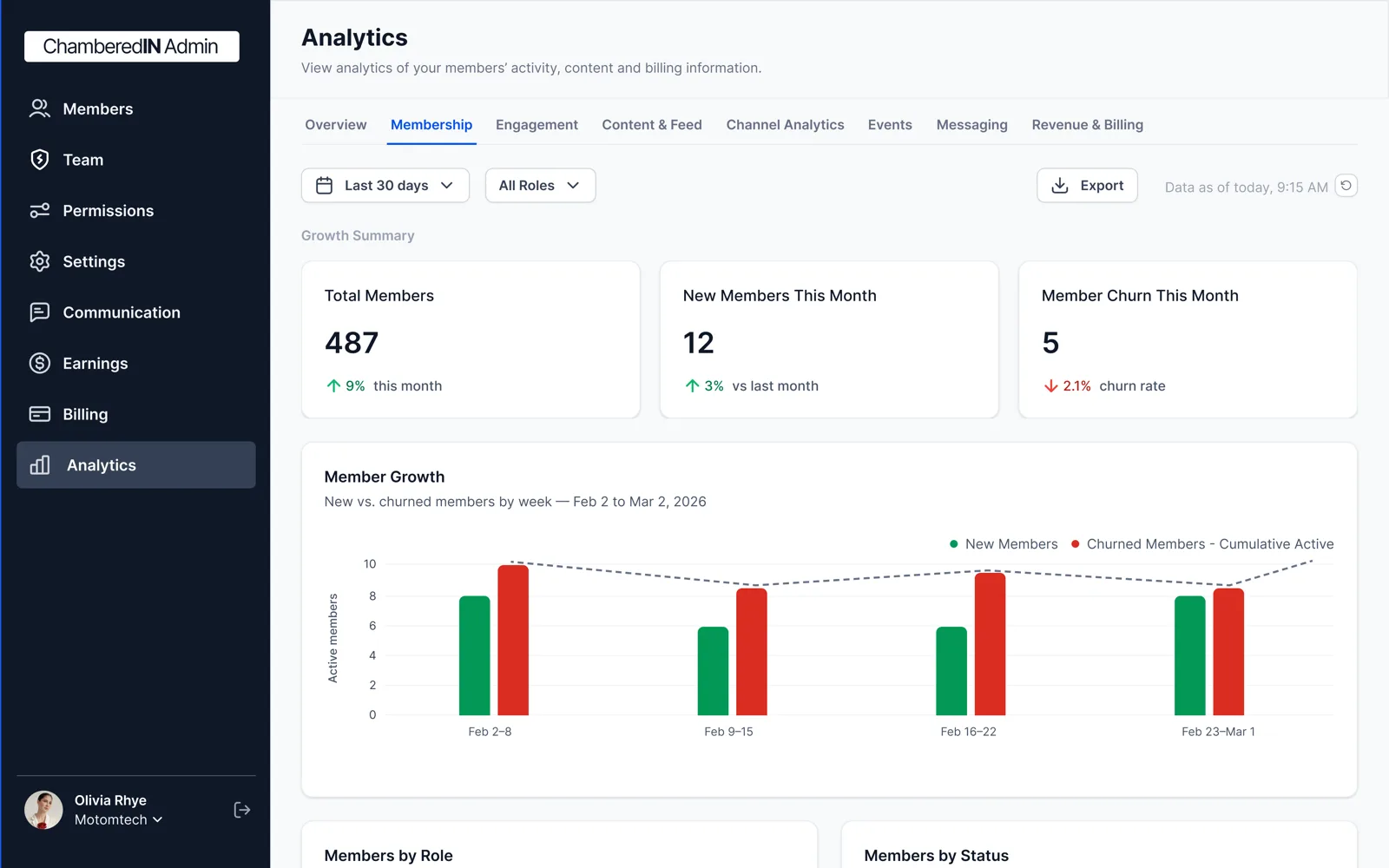
See membership, engagement, events, and revenue in one dashboard. Track new members and renewals, see which events filled, and know how much you collected, without exporting four spreadsheets the night before the board meets. The numbers your board asks for are already in front of you.
- Membership and renewal trends in one view.
- Event attendance and revenue per event.
- Dues collected and engagement, side by side.
Give Members an App They Actually Open
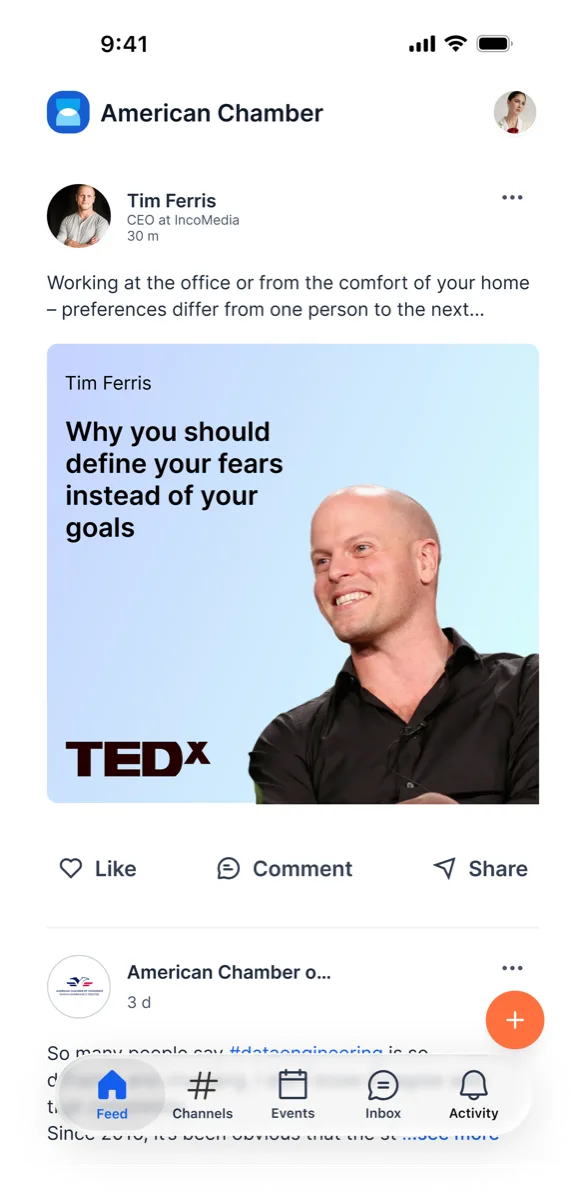
Members get a feed, channels, profiles, messaging, and a knowledge library on iOS and Android. A member who checks in, comments, and shows up to events is a member who renews. That engagement is the part of retention you usually cannot see, and it is the reason the app earns its place.
Built to Replace the AMS You Already Have
If your current AMS feels dated, charges for every extra, and still needs a spreadsheet beside it, here is the short version of what changes.
What Membership Teams Say
“We replaced three tools and a spreadsheet. Dues come in on schedule now, and I am not the one chasing them.”
“Event reminders by text and voice changed our turnout. We stopped guessing how many chairs to set out.”
“I walk into the board meeting with the numbers already pulled. That alone earned its keep.”
Two Simple Ways to Pay
Pick the model that fits how your organization runs. No surprise add-ons.
The plan above is what your organization pays for the platform. Your organization sets its own member plans that members pay. Two separate things.
Running more than one organization? Talk to sales
Frequently Asked Questions
What is ChamberedIn?
ChamberedIn is membership management software that puts members, dues and billing, events, and member communications in one place, plus a member app on iOS and Android and an admin analytics dashboard. It is built for the people who run membership organizations: chambers of commerce, business associations, professional associations, and networking groups. It replaces the dated AMS, the spreadsheet, the email tool, and the separate payment processor most teams run today.
Is ChamberedIn only for chambers of commerce?
No. Chambers are our primary customer and where the product started, so the chamber workflows are the most polished. ChamberedIn is built for membership organizations broadly, including business associations, professional associations, trade associations, and networking groups, because they share the same core jobs: members, dues, events, and communications.
How does ChamberedIn handle dues and payments?
You set up recurring or one-time dues and members pay online by card. Payouts go straight to your organization's bank through Stripe. If a payment fails, the account is suspended automatically and the member gets a pay-now link to fix it.
Can ChamberedIn replace our current AMS?
Yes. ChamberedIn covers members, dues and billing, events, and communications in one platform, which is the work most organizations spread across a legacy AMS and a few other tools. The vs-comparison page shows the differences feature by feature.
Is there an app for members?
Yes. Members get an app on iOS and Android with a feed, channels, profiles, messaging, and a knowledge library. The more members use it, the more likely they are to renew. Administration is done on the web; the app is for your members.
How much does ChamberedIn cost?
Two tiers. Premier is $499/month or $4,990/year and includes 250 members, with $10 per additional member per month above that. Revenue Share has $0 upfront cost and takes 10% of what your organization earns, with unlimited members and no monthly or per-seat fees. See the pricing page for the full breakdown, and talk to sales if you run more than one organization.
Can you redesign our website too?
Yes. Our team redesigns your organization's website and maintains it for an add-on fee, and ChamberedIn keeps it current: events, the member directory, and Library posts publish to the site automatically. Details on the websites page and the demo.