Membership Management Software for Your Whole Organization
Association and membership management software for chambers, associations, and networking groups. One member record connects dues, events, and communications. Add members in bulk, set roles, and keep the directory current.
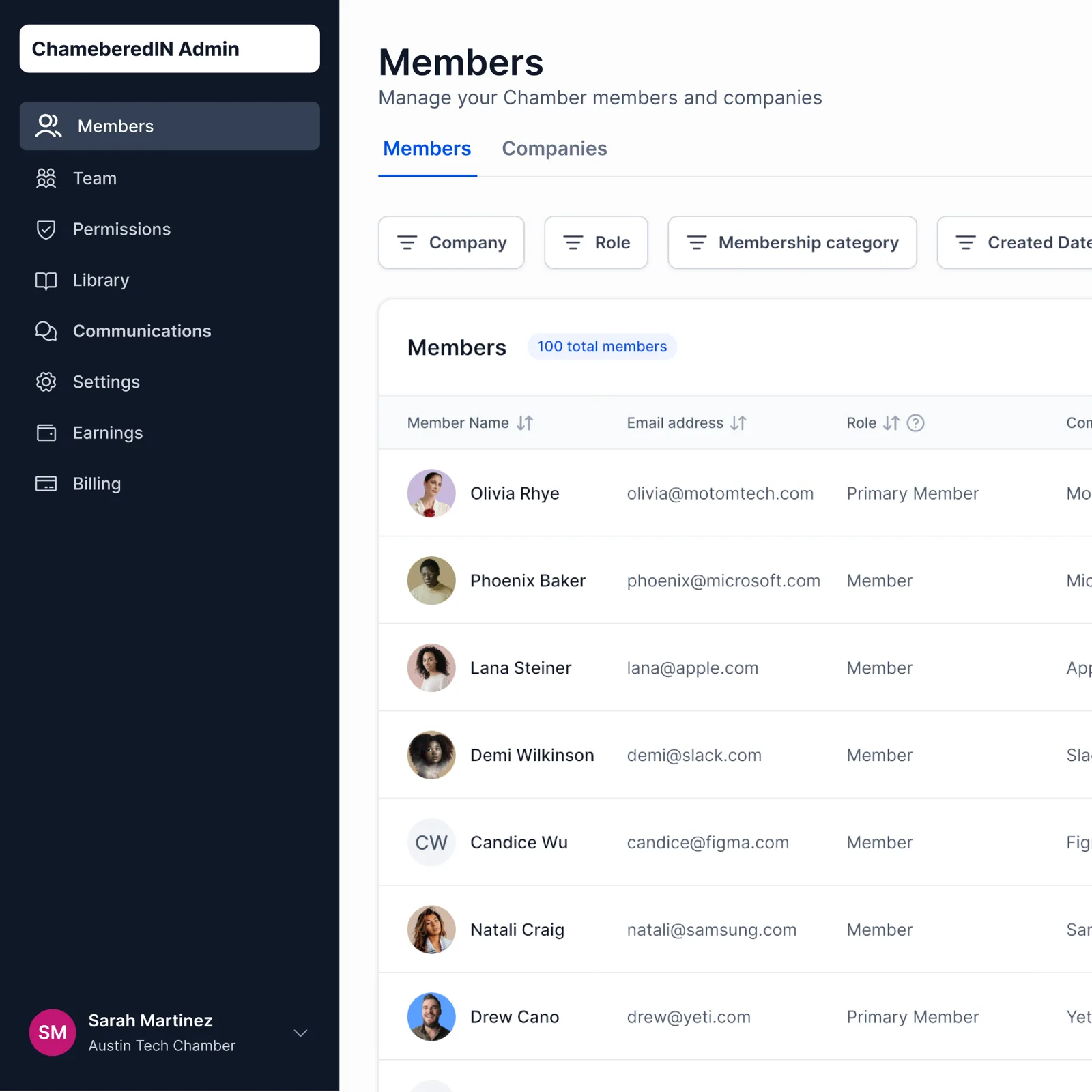
One Member Record, Connected to Everything
Every member and company lives in one record that the rest of ChamberedIn reads from. When you add a member, their dues, event RSVPs, and messages all point back to the same place, so you are not keeping three lists in sync by hand. Open a member to see who they are, what they pay, and what they have signed up for.
- Members and companies sit in one table each, with detail views for every record.
- Dues, events, and communications all read from the same member record.
- Update a member once and the change shows everywhere it is used.
Set Your Own Member Tiers and Let Renewals Run
Your organization defines its own member plans, and ChamberedIn does not impose a tier structure on you. Set a plan to renew on schedule, and the member is billed and renewed without a manual invoice every cycle. Adding a new cohort is a CSV upload or a single invite link away.
- Define the member plans your organization sells, at the prices you set.
- Renewals recur on schedule, so you are not re-invoicing every member by hand.
- Add members in bulk by CSV, or send a link invite for self sign-up.
Put a Company and Its People in One Place
A member company can hold more than one contact, with a primary member who carries the billing. Assign roles (admin, moderator, primary member, member) so each person gets the access that fits them. The board member, the staff contact, and the billing contact can all sit under one company without four separate logins fighting each other.
- Group multiple contacts under one member company.
- Name a primary member who holds the company's billing.
- Assign roles (admin, moderator, primary member, member) to control access.
A Member Directory That Stays Current
Members and companies show up in a directory that updates as records change, so it never drifts from your real roster. Each member has a CV-style profile that puts their role, company, and background in one view. Members can find each other, and you have a directory you are not rebuilding in a spreadsheet every quarter.
- A member and company directory, populated from the same records you manage.
- CV-style profiles show each member's role, company, and background.
- The directory reflects record changes, so it stays current without a manual rebuild.
Control Who Sees What
Roles decide what each person can do, from a full admin to a member who only sees their own membership. Reporting and the admin views stay with the people who run the organization. A member can also belong to more than one organization and switch between them, which suits the business owner who sits in a chamber and an association at once.
- Permissions follow roles, so admins, moderators, and members each see the right surface.
- Admin-only reporting and management views stay with your team.
- A member can belong to multiple organizations and switch between them.
The Rest of What ChamberedIn Runs
Frequently Asked Questions
How do we import our members?
You can bring members in by CSV in bulk, or send a link invite that lets members sign themselves up. Companies and their contacts come in the same way, so a multi-contact business does not have to be entered one person at a time.
Can a company have more than one contact?
Yes. A member company can hold several contacts, with a primary member who carries the company's billing. You assign each person a role so they see only what fits them.
Who can see member data and reports?
Access follows roles. A full admin sees the management and reporting views, while a member sees their own membership. Moderators and other roles sit in between. Reporting stays with the people who run the organization.
Can a member belong to more than one organization?
Yes. A member can belong to multiple organizations and switch between them, which suits a business owner who is active in a chamber and an association at once. Each organization still manages its own members and runs independently.
Does the directory update on its own?
The member and company directory is populated from the same records you manage, so it reflects changes as you make them. You are not maintaining a separate directory spreadsheet on the side.
What kinds of organizations is this built for?
Membership organizations of all kinds: chambers of commerce, business associations, professional and trade associations, and networking groups. Chambers are our primary customer and where the product started, so those workflows are the most polished, and the same member record, dues, events, and communications serve the rest.